
NixOS router with Intel J4125 and i225
I bought one of those cheap firewall-computers with an Intel Celeron J4125 and i225 2.5G LAN chipset. Then used NixOS to operate it.
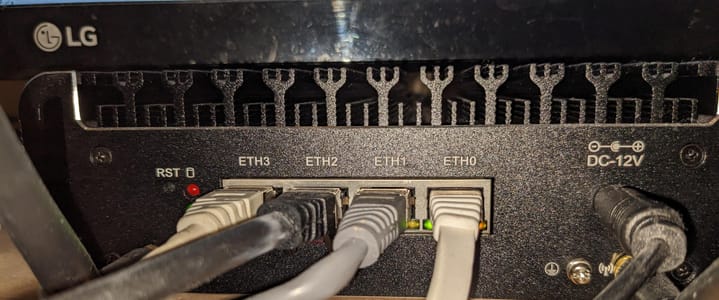

enp1s0 will be the port that is connected to a switch/home-router.
enp2s0, eno1 and enp4s0 are the ports for other devices, which connect to this router.
This configuration uses kea as a DHCP-Server and the DNS-Server unbound. The router itself does encrypted DNS requests with DoT.
The configuration supports both IPv4 and IPv6.
I have a basic settings file /etc/nixos/settings.nix:
rec {
  allowedSSHKeys = [
    "ssh-rsa XXXXXXXXXXX user@nixos"
    "ssh-rsa YYYYYYYYYYY user@nixos"
  ];

  # Rename them so they're easier to handle
  eth1 = "enp1s0";
  eth2 = "enp2s0";
  eth3 = "eno1";
  eth4 = "enp4s0";

  wanInterface = "${eth1}";
  lanInterfaces = [ "${eth2}" "${eth3}" "${eth4}" ];

  # What IPs to use
  baseInternalIp = "192.168.9";
  internalIp = "${baseInternalIp}.1";
  baseInternalIp6 = "fd03:1234:fde0:0000";
  internalIp6 = "${baseInternalIp6}::1";
  internalDomain = "lan";

  # Devices with reserved IPs and domains
  mac-nixos = "70:85:c2:93:c0:cb";
  mac-raspberrypi = "e4:5f:01:98:9d:7b";
  ip-nixos = "${baseInternalIp}.10";
  ip6-nixos = "${baseInternalIp6}::0010";
  ip-raspberrypi = "${baseInternalIp}.11";
  ip6-raspberrypi = "${baseInternalIp6}::0011";

  hostName = "fionn-router";

  # All reserved domains an their IPs
  domain-and-ips = builtins.map (x: { domain = "${x.domain}.${internalDomain}"; ip = "${x.ip}"; }) [
    { domain = "earth"; ip = "${ip-nixos}"; }
    { domain = "nixos"; ip = "${ip-nixos}"; }
    { domain = "raspberrypi"; ip = "${ip-raspberrypi}"; }
    { domain = "fionn-router"; ip = "${internalIp}"; }
  ];
}
This defines all basics we need for the router (so we don't always have to go into /etc/nixos/configuration.nix to tweak something).
Then there's the /etc/nixos/configuration.nix:
# Edit this configuration file to define what should be installed on
# your system.  Help is available in the configuration.nix(5) man page
# and in the NixOS manual (accessible by running ‘nixos-help’).

{ config, pkgs, ... }:

let
  settings = import ./settings.nix;
in
{
  imports =
    [ # Include the results of the hardware scan.
      ./hardware-configuration.nix
    ];

  nix.settings.auto-optimise-store = true;

  # Bootloader.
  boot.loader.systemd-boot.enable = true;
  boot.loader.efi.canTouchEfiVariables = true;
  boot.loader.efi.efiSysMountPoint = "/boot/efi";

  # Reduce writes onto disk
  services.journald.extraConfig =
  ''
    Storage=volatile
  '';

  networking.hostName = "${settings.hostName}"; # Define your hostname.

  # Allow NAT stuff ...
  boot.kernel.sysctl = {
    "net.ipv4.conf.all.forwarding" = true;
    "net.ipv6.conf.all.forwarding" = true;

    # source: https://github.com/mdlayher/homelab/blob/master/nixos/routnerr-2/configuration.nix#L52
    # By default, not automatically configure any IPv6 addresses.
    "net.ipv6.conf.all.accept_ra" = 0;
    "net.ipv6.conf.all.autoconf" = 0;
    "net.ipv6.conf.all.use_tempaddr" = 0;

    # On WAN, allow IPv6 autoconfiguration and tempory address use.
    "net.ipv6.conf.${settings.wanInterface}.accept_ra" = 2;
    "net.ipv6.conf.${settings.wanInterface}.autoconf" = 1;
  };

  # Configure network proxy if necessary
  # networking.proxy.default = "http://user:password@proxy:port/";
  # networking.proxy.noProxy = "127.0.0.1,localhost,internal.domain";

  # Set your time zone.
  time.timeZone = "Europe/Berlin";

  # Select internationalisation properties.
  i18n.defaultLocale = "en_US.utf8";

  # Allow unfree packages
  nixpkgs.config.allowUnfree = true;

  environment.variables = { EDITOR = "vim"; };

  # List packages installed in system profile. To search, run:
  # $ nix search wget // Comment: Doesn't work (nix search)
  environment.systemPackages = with pkgs; [
    wget
    traceroute dig iftop ethtool btop
    pciutils usbutils
    fd
    wakelan
    htop
    tmux
  ] ++ (with pkgs.vimPlugins; [ vim-nix ]);

  # Maybe use nano instead?
  programs.vim = {
    defaultEditor = true;
    package = ((pkgs.vim_configurable.override {}).customize {
      name = "vim";
      vimrcConfig.packages.myplugins = with pkgs.vimPlugins; {
        start = [ vim-nix ];
        opt = [];
      };
      vimrcConfig.customRC = ''
        set nocompatible
        set expandtab
        set ts=2
        set sw=2
        syntax on
      '';
    });
  };

  users.mutableUsers = false;
  users.users.root = {
    openssh.authorizedKeys.keys = settings.allowedSSHKeys;
    hashedPassword = "XXXXXXXXXXXXXXXXXXXXXXXXXXXXXXXXXXXXXXXXXXXXXXXXXX";
  };

  # Define a user account
  users.users.user = {
    openssh.authorizedKeys.keys = settings.allowedSSHKeys;
    isNormalUser = true;
    description = "Fionn Langhans";
    extraGroups = [ "wheel" ];
    hashedPassword = "XXXXXXXXXXXXXXXXXXXXXXXXXXXXXXXXXXXXXXXXXXXXXXXXXX";
    packages = with pkgs; [];
  };

  # List services that you want to enable:

  # Enable the OpenSSH daemon.
  services.openssh = {
    enable = true;
    passwordAuthentication = false;
  };

  services.kea.dhcp4 = {
    enable = true;
    settings = {
      interfaces-config = {
        interfaces = [ "br0" ];
      };
      lease-database = {
        name = "/var/lib/kea/dhcp4.leases";
        persist = true;
        type = "memfile";
      };
      option-data = [
        {
          name = "domain-name-servers";
          data = settings.internalIp;
          always-send = true;
        }
        {
          name = "routers";
          data = settings.internalIp;
        }
        {
          name = "domain-name";
          data = "${config.networking.hostName}.${settings.internalDomain}";
        }
      ];

      rebind-timer = 2000;
      renew-timer = 1000;
      valid-lifetime = 4000;

      subnet4 = [
        {
          pools = [
            {
              pool = "${settings.baseInternalIp}.100 - ${settings.baseInternalIp}.230";
            }
          ];
          subnet = "${settings.baseInternalIp}.0/24";
          reservations = [
            {
              hw-address = settings.mac-nixos;
              ip-address = settings.ip-nixos;
            }
            {
              hw-address = settings.mac-raspberrypi;
              ip-address = settings.ip-raspberrypi;
            }
          ];
        }
      ];
    };
  };

  services.kea.dhcp6 = {
    enable = true;
    settings = {
      interfaces-config = {
        interfaces = [ "br0" ];
      };
      lease-database = {
        name = "/var/lib/kea/dhcp6.leases";
        persist = true;
        type = "memfile";
      };
      option-data = [
        {
          name = "dns-servers";
          data = settings.internalIp6;
        }
        {
          name = "unicast";
          data = settings.internalIp6;
        }
      ];

      preferred-lifetime = 3000;
      rebind-timer = 2000;
      renew-timer = 1000;
      valid-lifetime = 4000;

      subnet6 = [
        {
          pools = [
            {
              pool = "${settings.baseInternalIp6}::1000-${settings.baseInternalIp6}::EFFF";
            }
          ];
          subnet = "${settings.baseInternalIp6}::0/64";
          reservations = [
            {
              hw-address = settings.mac-nixos;
              ip-addresses = [ settings.ip6-nixos ];
            }
            {
              hw-address = settings.mac-raspberrypi;
              ip-addresses = [ settings.ip6-raspberrypi ];
            }
          ];
        }
      ];
    };
  };

  services.radvd = {
    enable = true;
    config = ''
      interface br0 {
        AdvSendAdvert on;
        prefix ${settings.baseInternalIp6}::/64 {
          AdvOnLink on;
          AdvAutonomous on;
          AdvRouterAddr on;
        };
        route ${settings.internalIp6}/128 {
        };
        RDNSS ${settings.internalIp6} {
        };
      };
    '';
  };

  # This is not really secure, but some games need it.
  services.miniupnpd = {
      enable = true;
      externalInterface = "${settings.wanInterface}";
      internalIPs = [ "br0" ];
  };

  # DNS-Server
  services.unbound = {
    enable = true;
    settings = {
      server = {
        interface = [ "127.0.0.1" "${settings.internalIp}" "${settings.internalIp6}" ];
        tls-system-cert = true;
        access-control = [
          "0.0.0.0/0 refuse"
          "127.0.0.0/8 allow"
          "${settings.baseInternalIp}.0/24 allow"
          "${settings.baseInternalIp6}::0/64 allow"
        ];

        prefer-ip6 = true;

        private-domain = [ "local" "${settings.internalDomain}" ];
        private-address = [
          "${settings.baseInternalIp}.0/24"
          "${settings.baseInternalIp6}::0/64"
        ];
        unblock-lan-zones = true;
        insecure-lan-zones = true;

        local-zone = builtins.map (x: "\"${x.domain}.\" static") settings.domain-and-ips;
        local-data = builtins.concatLists (builtins.map
          (domain-and-ip: [
            "\"${domain-and-ip.domain}. 3600 IN A ${domain-and-ip.ip}\""
          ]) settings.domain-and-ips);
        local-data-ptr = builtins.map (x: "\"${x.ip} ${x.domain}\"") settings.domain-and-ips;
      };
      forward-zone = [
        {
          name = ".";
          forward-tls-upstream = true;
          forward-addr = [
            "2620:fe::fe@853#quad9.net"
            "2606:4700:4700::1111@853#cloudflare-dns.com"
            "2001:4860:4860::8888@853#dns.google"
            "9.9.9.9@853#quad9.net"
            "1.1.1.1@853#cloudflare-dns.com"
            "8.8.8.8@853:dns.google"
          ];
        }
        {
          name = "onion.";
        }
      ];
      remote-control.control-enable = false;
    };
  };

  # Tailscale, because it's convenient
  services.tailscale = {
    enable = true;
  };

  services.avahi = {
    enable = true;
    nssmdns = true;
    interfaces = [ "br0" "tailscale0" ];
  };

  services.syncthing = {
    enable = true;
    user = "user";
    group = "users";
    guiAddress = "${settings.internalIp}:8384";
    dataDir = "/home/user";
    devices = {
      codefionn = {
        addresses = [];
        id = "XXXXXXXXXXXXXXXXXXXXXXXXXXXXXXXXXXXXXXXXXXXXXXXXXXXXXXXXXXXXXXX";
      };
      raspberrypi = {
        addresses = [];
        id = "XXXXXXXXXXXXXXXXXXXXXXXXXXXXXXXXXXXXXXXXXXXXXXXXXXXXXXXXXXXXXXX";
      };
    };
    folders.default = {
      id = "default";
      label = "Sync";
      path = "/home/user/Sync";
      devices = [ "codefionn" "raspberrypi" ];
    };
  };

  # If you reboot the router often, this his handy
  systemd.services.startup-tune = {
    enable = true;
    path = with pkgs; [ beep kmod ];
    preStart = "modprobe pcspkr";
    script = "beep -f 1000 -l 50 -r 3 -d 1000 -n -d 100 -n -f 500 -d 1000 -l 50 -r 1";
    wants = [ "network-online.target" ];
    after = [ "network-online.target" ];
    wantedBy = [ "multi-user.target" ];
  };

  # Open ports in the firewall.
  # networking.firewall.allowedTCPPorts = [ ... ];
  # networking.firewall.allowedUDPPorts = [ ... ];
  networking.firewall.checkReversePath = "loose";
  networking.firewall.interfaces.br0 = {
    allowedTCPPorts = [ 53 22000 8384 ];
    allowedTCPPortRanges = [
      {
        from = 1714;
        to = 1764;
      }
    ];
    allowedUDPPorts = [ 53 22000 21027 ];
    allowedUDPPortRanges = [
      {
        from = 1714;
        to = 1764;
      }
    ];
  };

  #----------
  # Enables DHCP on each ethernet and wireless interface. In case of scripted networking
  # (the default) this is the recommended approach. When using systemd-networkd it's
  # still possible to use this option, but it's recommended to use it in conjunction
  # with explicit per-interface declarations with `networking.interfaces.<interface>.useDHCP`.
  networking = {
    useDHCP = false;
    hosts = {
      "127.0.0.1" = [ "localhost" "${config.networking.hostName}" "${config.networking.hostName}.local" ];
    };
    interfaces = {
      "${settings.wanInterface}" = {
        useDHCP = true;
        # ... Or maybe define it statically
      };
      br0 = {
        ipv4.addresses = [
          { address = "${settings.internalIp}"; prefixLength = 24; }
        ];
        ipv6.addresses = [
          { address = "${settings.internalIp6}"; prefixLength = 64; }
        ];
      };
    };

    bridges.br0 = {
      interfaces = settings.lanInterfaces;
    };

    nat = {
      enable = true;
      enableIPv6 = true;
      externalInterface = "${settings.wanInterface}";
      internalInterfaces = [ "br0" ];
    };

    networkmanager.enable = false;
  };

  # Or disable the firewall altogether.
  # networking.firewall.enable = false;

  # This value determines the NixOS release from which the default
  # settings for stateful data, like file locations and database versions
  # on your system were taken. It‘s perfectly fine and recommended to leave
  # this value at the release version of the first install of this system.
  # Before changing this value read the documentation for this option
  # (e.g. man configuration.nix or on https://nixos.org/nixos/options.html).
  system.stateVersion = "22.05"; # Did you read the comment?
}
Sadly, my Intel AX210 wireless M.2 chipset doesn't work well with both Linux and this router.